I had a flow containing this endpoint:
<vm:inbound-endpoint exchange-pattern="one-way" address="vm://ABC">
<idempotent-redelivery-policy useSecureHash="false" idExpression="#[message.id]" />
<vm:transaction action="ALWAYS_BEGIN"/>
</vm:inbound-endpoint>
And a standard Rollback Exception Strategy with maxRedeliveryAttempts set to 0.
When an exception was thrown in the flow, the Rollback Exception Strategy was hit but the redelivery exhausted block was never hit because the message was never rolled back.
The problem was that the message was sent to the inbound endpoint synchronously (MuleClient.send). This wont work because the inbound endpoint is one-way. When the message was sent asynchronously (MuleClient.dispatch), the message was rolled back.
Tuesday, November 1, 2016
Monday, August 8, 2016
Using MUnit with flows containing a Rollback Exception Strategy
Here is a flow containing a Rollback Exception Strategy:


The flow receives messages from a JMS Queue and processes them. If an exception occurs, the Rollback Exception Strategy replays the message or sends it to a DLQ if the exception continues to occur.
An MUunit test might look like this:
This test is fine for test cases that don't throw an exception. For test cases that do throw an exception, the MUnit test will never reach the Assert True component. The exception gets caught by the Rollback Exception Strategy in the Main flow, but because there is no actual JMS Queue the message can't be rolled back and Rollback Exception Strategy re-throws the exception.
A strategy for tests that throw exceptions is to create in the MUnit fixture a wrapper flow that catches the exception and returns it in the payload. See the following image; the wrapper flow InvokeMainFlowAndReturnException is called instead of the Main flow. InvokeMainFlowAndReturnException calls the Main flow, catches the exception thrown by the Rollback Exception Strategy, and returns the exception in the payload. The expression that extracts the exception is simply #[exception.?cause]

Wednesday, April 6, 2016
Two-Way SSL Authentication : Client to Mule
Introduction
This page describes how two-way ssl authentication can be implemented for calls from a client to Mule. Here the client is referred to as ServiceMax.
Overview
The following diagram compares one-way with two-way ssl authentication, as described in configuring-https-mule.
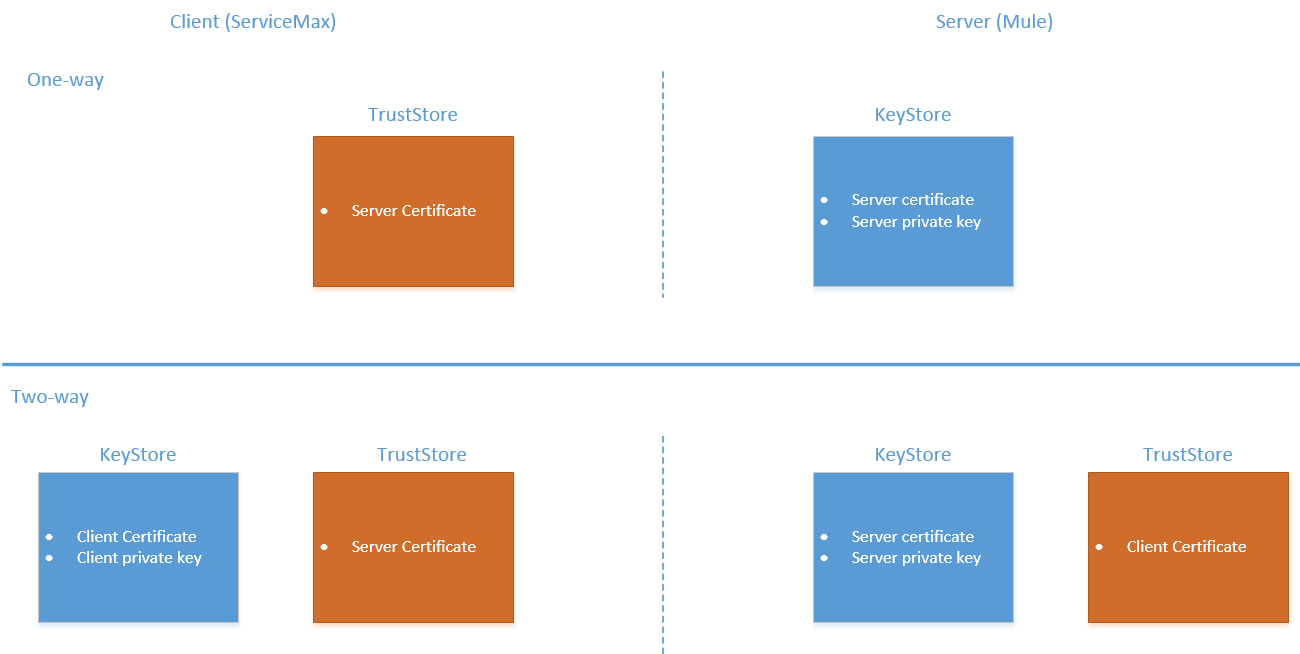
For two-way ssl authentication to work, the mule application must
- Expose an https endpoint
- Reference a keystore containing the certificate+private key for the https endpoint
- Reference a truststore containing ServiceMax's certificate
and ServiceMax must
- Have its own certifcate+private key
- Trust the certificate of the mule endpoint
The mule application's https endpoint must be configured as described in configuring-https-mule
HAProxy
In this scenario, ServiceMax does not talk directly to Mule, it communicates through an HAProxy instance.
HAProxy is configured to do SSL Termination (ie. the traffic transitions between encrypted for ServiceMax<->HAProxy and unencrypted for HAProxy<->Mule).
frontend www-https
   bind :443 ssl crt /haproxy/HAPROXY_CERT.pem
   reqadd X-Forwarded-Proto:\ https
   acl mule-hello path_beg /mule/hello
   use_backend mule-hello-backend if mule-hello
If Mule was to handle two-way ssl communication, HAProxy would need to be reconfigured to do simple tcp forwarding.
However, if we could perform two-way ssl authentication in HAProxy, HAProxy could continue to perform SSL offload and Mule wouldn’t need any certificate setup and could simply expose an http endpoint.
It turns out that HAProxy can be configured with client certificates, as discussed in ssl-client-certificate-management-at-application-level/.
Investigation
To test two-way ssl authentication in HAProxy
CURL Client
In this test, we mock the ServiceMax client using cURL.
1) Generate mock ServiceMax Cert and private key (Ref http://help.globalscape.com/help/secureserver3/Generating_a_PKCS_12_private_key_public_certificate.htm)
In your work directory:
openssl genrsa -des3 2048 > mockservicemax.pem
openssl req -new -key mockservicemax.pem -out mockservicemax.csr
openssl x509 -req -days 3650 -in mockservicemax.csr -signkey mockservicemax.pem -out mockservicemax.crt
2) Copy the HAPROXY_CERT.pem certificate to your working directory (remove the private key if present).
3) Configure HAProxy:
frontend www-https
   bind :443 ssl crt /haproxy/HAPROXY_CERT.pem ca-file ./client.crt verify required
   ...
4) Add the mockservicemax certificate to the client.crt file:
cat mockservicemax.crt > /haproxy/client.crt
5) Restart HAProxy.
6) Simulate a call from ServiceMax. Here, --cacert defines the trusted certificates (i.e. the haproxy certificate), --cert defines the client certificate, --key defines client certificate private key.
curl https://HAPROXY_HOST.com/mule/hello --trace trace.txt --cert ./mockservicemax.crt:password --key ./mockservicemax.pem --cacert HAPROXY_CERT.pem
If we do not provide a client certificate, the command fails with handshake failure.
If we generate another mock service max certificate, and use it in the command above, the command fails with unknown ca because the certificate has not been added to the haproxy truststore (client.crt file).
Sunday, April 3, 2016
Where are New Zealand's Lotto Outlets
The official Lotto Store Locator only shows the lotto outlets in a small window of New Zealand at a time.
The following application shows a map containing the locations of all the lotto stores in New Zealand:
Location of Lotto Outlets in New Zealand
Last updated April 2016
The following application shows a map containing the locations of all the lotto stores in New Zealand:
Location of Lotto Outlets in New Zealand
Last updated April 2016
Sunday, February 21, 2016
Configuring Mule tests to read the Mule Licence
When running unit/functional tests against a Mule application that uses EE plugins, you may get the error:
[ERROR] Couldn't validate license key!
[ERROR] ... java.lang.RuntimeException: Invalid license (org.mule.api.lifecycle.InitialisationException): de.schlichtherle.license.NoLicenseInstalledException: There is no license certificate installed for MuleSource Enterprise Edition.
Ensure that the mule licence is on the test classpath:
<!-- Add the mule licence to the test classpath. The junit tests require a mule enterprise license. -->
<plugin>
<groupId>org.codehaus.mojo</groupId>
<artifactId>build-helper-maven-plugin</artifactId>
<version>1.7</version>
<executions>
<execution>
<id>add-mule-license-test-resource</id>
<phase>generate-test-sources</phase>
<goals>
<goal>add-test-resource</goal>
</goals>
<configuration>
<resources>
<resource>
<directory>/opt/mule/conf</directory>
<includes>
<include>muleLicenseKey.lic</include>
</includes>
</resource>
</resources>
</configuration>
</execution>
</executions>
</plugin>
Mule will not be able to read the licence if Xalan (XSLT processor) is not on the classpath:
ERROR] ... org.springframework.beans.factory.BeanDefinitionStoreException:
... java.lang.NoClassDefFoundError: org/apache/xpath/XPathAPI (org.mule.api.lifecycle.InitialisatonException): org.apache.xpath.XPathAPI
Add xalan to the test classpath:
<dependency>
<groupId>xalan</groupId>
<artifactId>xalan</artifactId>
<scope>test</scope>
</dependency>
Thursday, November 19, 2015
Sinus Scroll using HTML5 Canvas
Inspired by the Retro Sinus Scrollers, I wrote a more modern version using HTML5 canvas:
HTML5 Sinus Scroller
HTML5 Sinus Scroller
Tuesday, November 17, 2015
Retro Sinus Scrollers
Recently I discovered a couple of javascript scrollers I wrote in 2001. Here they are:
Retro Scrollers
At the time I was working on a web application and had some down time. The project manager had whimsically mentioned easter eggs, so I added these under a suitably obscure url. The message text was a list of credits to those who had developed the application.
Retro Scrollers
At the time I was working on a web application and had some down time. The project manager had whimsically mentioned easter eggs, so I added these under a suitably obscure url. The message text was a list of credits to those who had developed the application.
Subscribe to:
Posts (Atom)